HushReply GitHub

The free ManyChat alternative for comment-to-DM.

When someone comments a word like “LINK” on your Instagram or Facebook post, HushReply sends them a private message with what they asked for. Automatically, in seconds. It can also reply under their comment and like it. No monthly fee and no contact limits.

Public comment in · Private reply out

What it does

Everything below is included, free, today.

Keywords

  • Reacts to the words you pick, like LINK, PRICE or GUIDE.
  • Spots the word in any language, even with emoji around it, but not inside other words.
  • Choose which posts and which platform each keyword works on.
  • Ignore comments that contain words you don't want, like “spam”.

Replies

  • Sends a private message that greets the person by name.
  • Can reply under the comment, mixing a few versions so it never looks copy-pasted.
  • Can like the comment on Facebook.
  • Honest replies: never says “check your DMs” unless the message really went out.

Accounts

  • Works with Instagram business and creator accounts, and Facebook Pages.
  • Run every account you own from one setup.
  • Give each account its own keywords, or share keywords between them.

Safe by design

  • Only Meta can set it off, so nobody else can send messages as you.
  • One message per comment, even if Meta reports the same comment twice.
  • Never replies to its own replies.
  • Won't message the same person again and again.

Easy to run

  • A simple dashboard to manage everything. No code.
  • Test mode shows what would be sent before anything goes out.
  • Keeps your Instagram connection alive by itself.
  • Comes with the privacy and terms pages Meta asks for.
  • No Meta approval process for your own accounts.

$0, really.

HushReply is free, and it runs on Cloudflare's free plan, in an account that belongs to you.

  • Only keyword comments use up the free allowance. A busy post full of other comments costs nothing.
  • No contact limits and no per-account fees. Add every account you own.
  • Your data stays with you. Your settings and account keys live in your own Cloudflare account, not on someone else's servers.

What it costs

HushReply
$0
Cloudflare free plan
$0
Keyword comments answered
≈ 500 / day
Other comments
free
Contacts
no limit
Need more? Cloudflare paid plan
$5 / month

HushReply or ManyChat?

ManyChat does a lot more. HushReply does the comment-to-DM part, free, on your own account. Here's the honest split.

Feature comparison between HushReply and ManyChat
FeatureHushReplyManyChat
PriceFree, on your own free Cloudflare accountFree plan, then from $14/mo; Pro from $29/mo
ContactsNo limit25 active contacts on Free; 250 from $14/mo, 2,500 on Pro; price grows with contacts
BrandingNone“Powered by Manychat” on Free
Instagram comment → DMYesYes
Facebook comment → DMYesYes
Public reply to the commentYes, with rotating variantsYes
Multiple accountsYes, every account you own, freeYes
Where your data livesYour Cloudflare accountManyChat's servers
Open sourceYes, free to use and changeNo
Visual flow builderNo. Simple keyword rules, set up in a dashboardYes
Broadcasts and sequencesNoYes
Story replies, “follow to get the link”Not yetYes
Setup timeAbout an hour, once, mostly in Meta's settingsMinutes

Prices from third-party roundups of manychat.com/pricing, October 2026, at annual-billing rates. Check their site for current pricing. Not affiliated with ManyChat or Meta.

Live in five steps

No servers to look after. Most of the time goes on Meta's settings, and the setup guide walks you through every screen.

  1. Create a Meta app

    A free “app” on Meta's developer site is what allows HushReply to message people for you. The setup guide shows every click.

  2. Click Deploy to Cloudflare

    One button makes your own copy of HushReply in your GitHub and sets it up on a free Cloudflare account. It asks for the keys from step 1, plus a verify token: any password you make up.

  3. Connect it to Meta

    In your Meta app's webhook settings, paste your HushReply address (it ends in /webhook) and the verify token you made up in step 2. Now Meta tells HushReply about new comments.

  4. Test it

    Comment your keyword on your own post. HushReply starts in test mode, so it shows what it would send without sending anything.

  5. Go live

    In your copy on GitHub, open wrangler.toml, change DRY_RUN = "true" to "false" and commit. HushReply updates itself within a couple of minutes.

LINK example rule

When someone comments
LINK
Send them a private message
Hey Maya! Here's the link you asked for 👇 example.com
Reply under their comment, one of
“Just sent it to your DMs 📬” · “Check your DMs 📬” · “Sent! Check your inbox 📬”

Every rule is a card

A rule is three things: the word to watch for, the message to send, and what to say under the comment. This one comes with HushReply, ready to edit.

The word
Catches LINK, link and “Link 🙏”, but not “linked”.
The message
Sent privately to the person who commented, greeting them by name.
The reply
Posted under their comment. HushReply picks one of your versions each time, so replies don't look copy-pasted.

Make your own in the dashboard: fill in a form, try a comment, click save. Or edit rules.json right on GitHub's website. HushReply updates itself either way. Rule reference

Point, click, save. No code.

HushReply comes with a simple dashboard. Set up your keywords and messages, add your accounts and paste in your Meta keys, all in forms. Try a comment to see what would be sent, then publish with one click.

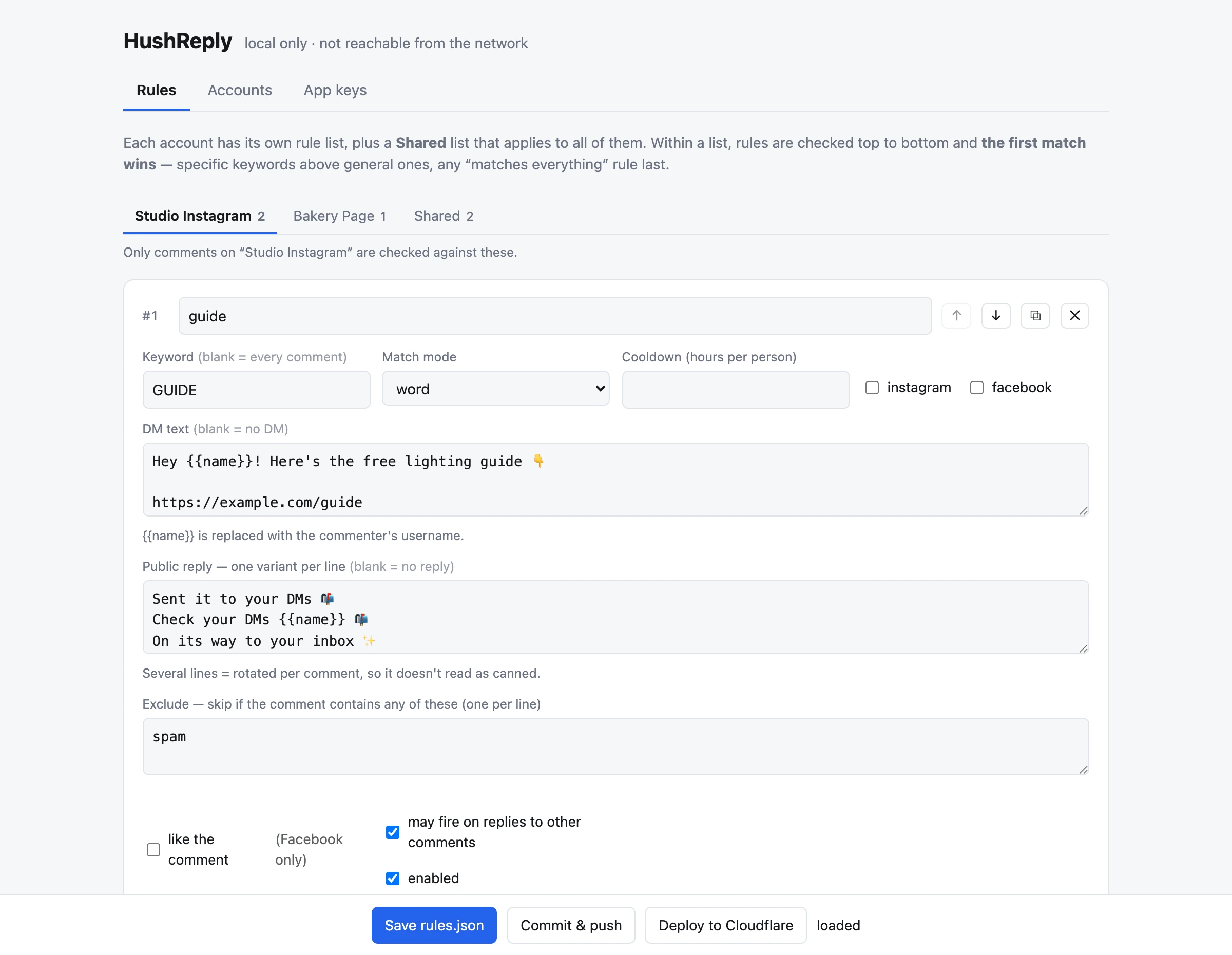
The Rules tab: a tab per account plus Shared, and a form for the rule 'guide' with its keyword, match mode, DM text, three public reply variants and an exclude list. Save rules.json, Commit & push and Deploy buttons along the bottom.
One simple form per keyword, with a tab for each account. Example data.

Rules

  • The keyword, the message and the replies are simple form fields.
  • Add, reorder, duplicate or switch off a rule with one click.
  • Mistakes are highlighted, and a broken rule can't be saved.

Accounts

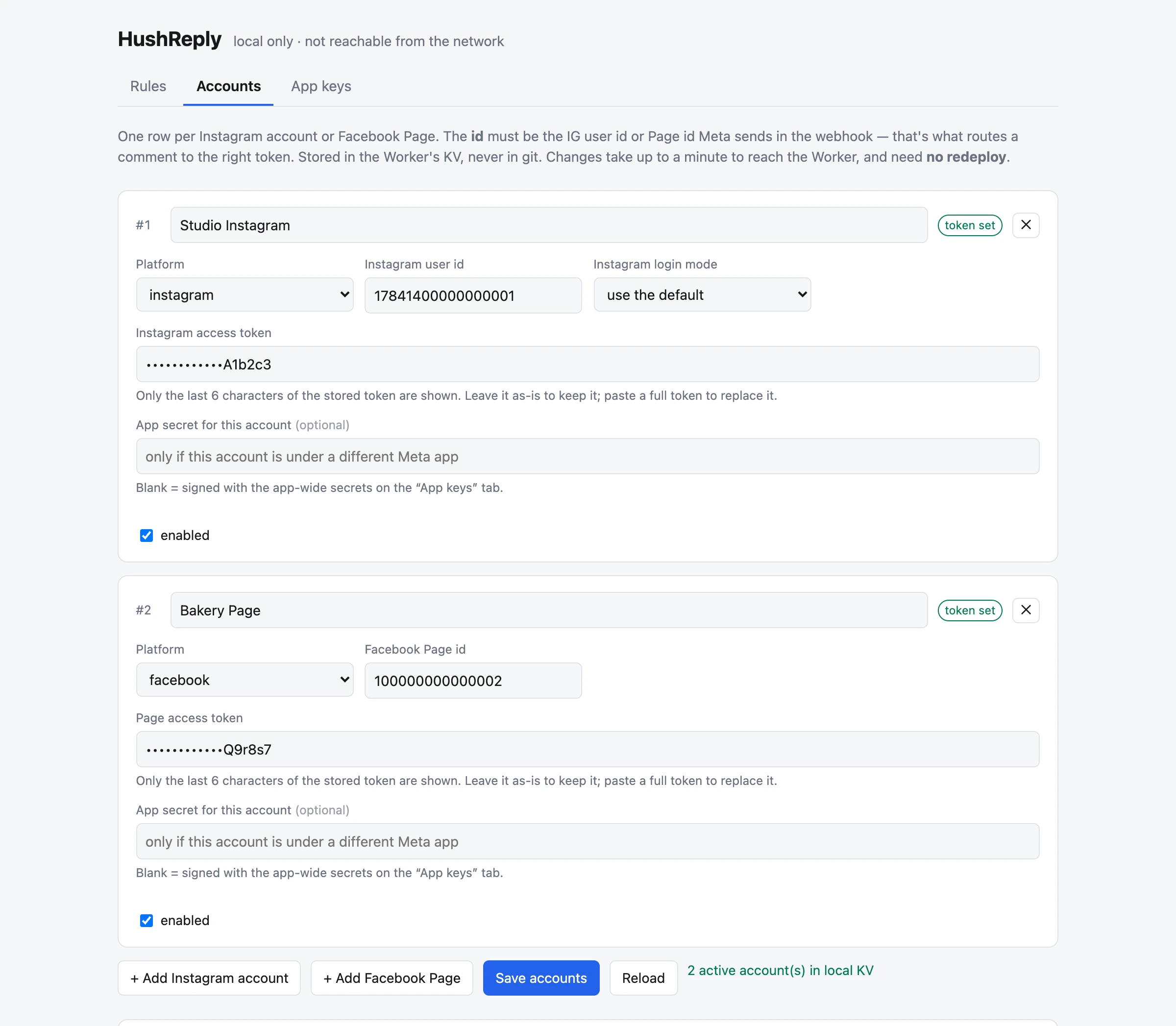
  • Add each Instagram account and Facebook Page you own.
  • Live within a minute. No redeploy.
  • Your account keys stay hidden on screen and are never saved to a file.

App keys

  • Paste in the keys from your Meta app.
  • Works straight away. No digging through Cloudflare's settings.
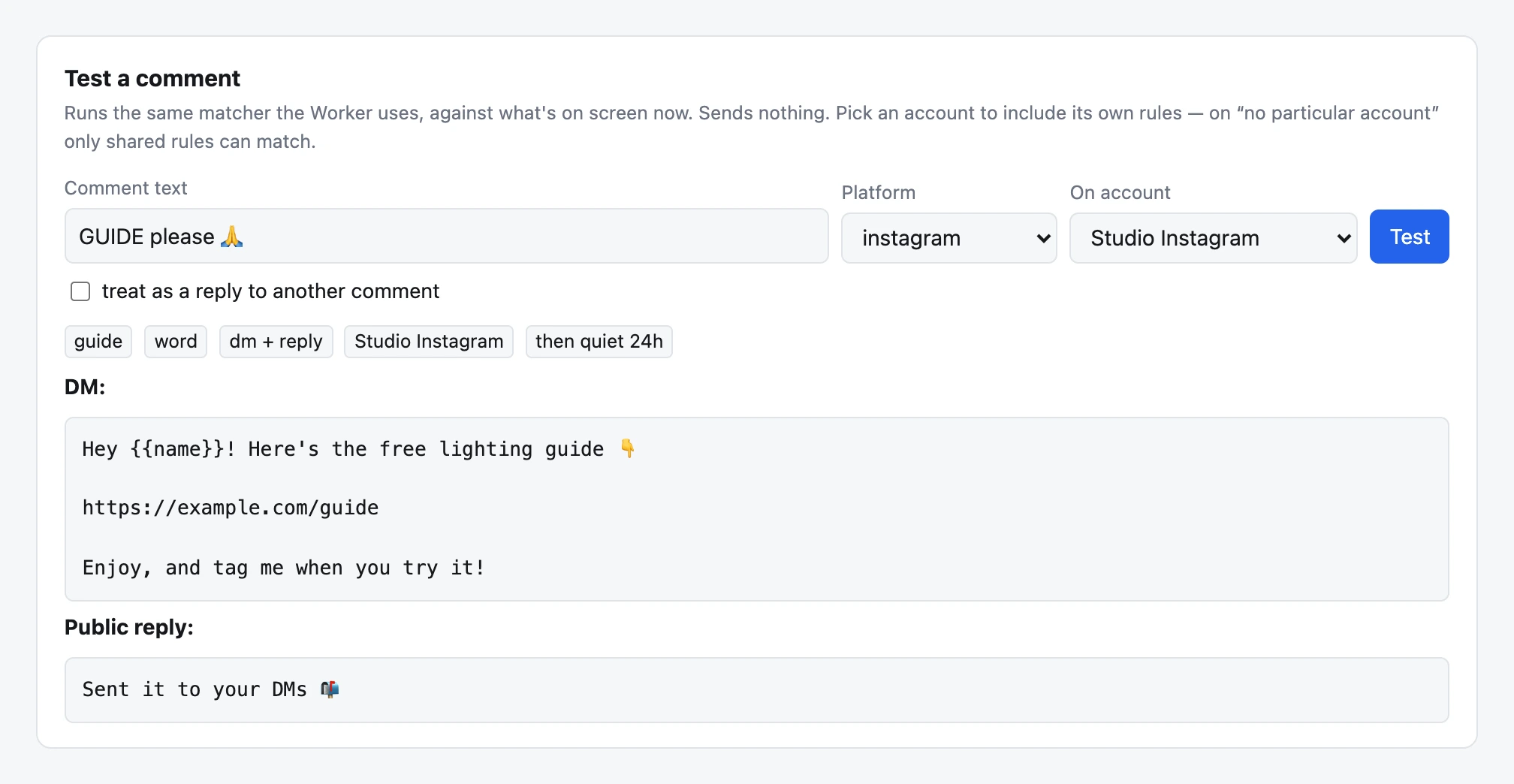
The Test a comment box: the comment 'GUIDE please' on Studio Instagram matches the 'guide' rule, showing the DM that would be sent and the public reply.
Type a comment to see exactly what HushReply would send. Nothing goes out.
The Accounts tab with an Instagram account and a Facebook Page, each with its id, a masked access token and a 'token set' badge, plus buttons to add accounts and save.
All your accounts in one list, with their keys kept hidden.

Opening the dashboard

It runs on your own computer. Install Node.js (free) once, then copy and paste these lines into your computer's Terminal app, one at a time. Put your GitHub username in place of YOUR-NAME. The login line opens Cloudflare in your browser so you can sign in.

# the first time
git clone https://github.com/YOUR-NAME/hushreply
cd hushreply
npm install
npx wrangler login

# every time after that (opens in your browser)
npm run dashboard

Change a keyword, click Save, then Commit & push. HushReply updates itself within a couple of minutes. Dashboard guide

Do I need it?
For one Instagram account and one Facebook Page it's optional: you can change keywords right on GitHub's website. For several accounts, or if you'd rather fill in forms, use the dashboard.
Why on my computer, not a website?
Your account keys travel only between your computer and your own Cloudflare account. Nothing is put online for someone to break into.
Does it change things straight away?
New accounts and keys work within a minute. Keyword changes go live when you click Commit & push. A test switch lets you try everything safely first.

Questions

Is it really free?

Yes. HushReply is free, and it runs on Cloudflare's free plan in your own account. That's enough to answer about 500 keyword comments every day, and comments without a keyword cost nothing. If you ever need more, Cloudflare's paid plan is $5 a month.

Do I need Meta to approve anything?

Not for your own accounts. Meta lets an app that only works on your own Pages and Instagram accounts skip its review process. You'd need Meta's approval to run HushReply on other people's accounts.

Is this allowed by Meta?

Yes. It uses Meta's own official feature for answering a comment with a private message, the same one the big tools use. It never logs in as you and never scrapes anything. Meta's rules: one private message per comment, sent within 7 days of the comment.

What does my Instagram account need?

It must be a public Business or Creator account, with “Allow access to messages” turned on in Instagram's message settings. It works on comments on your own posts.

Can I run it for clients?

Not out of the box. Running it on accounts you don't own needs Meta's approval process. Each client can set up their own free copy instead.

Do I need to know how to code?

No. The Deploy button asks for everything it needs, and the dashboard turns rules, accounts and keys into forms, so you never edit a file by hand.

The dashboard runs on your computer, so you install Node.js once and copy-paste a few commands. With one Instagram account and one Page you can skip it and edit rules in GitHub's web editor instead.

Can I change it or share it?

Yes. It's open source (AGPL-3.0 license): use it, change it and run it for free. If you offer a changed version as a service to other people, you share your changes too.

Say the word. They get the DM.

Free and open source, running on your own Cloudflare account.